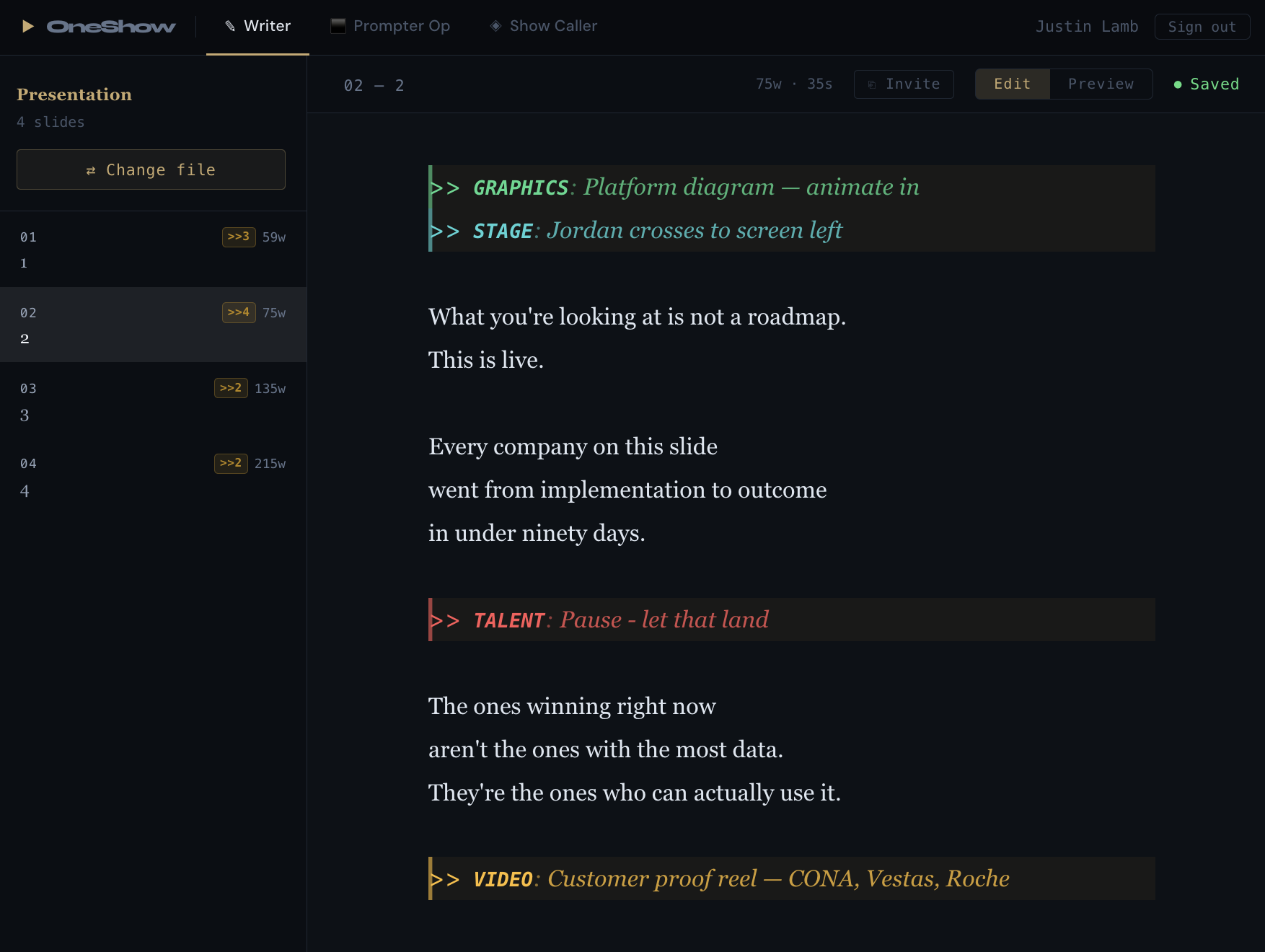
Write the script, build the running order, and read it on the prompter — without leaving OneShow or emailing a single file.
⬡
One source of truth
Edit the script once and every role — caller, prompter, client — sees it live. No sync step, no file to send.
📄
Script editor, built in
Write and edit speaker notes right inside OneShow — no need to open PowerPoint — and every keystroke saves itself.
⊞
Cues write themselves
Mark where a cue fires and the running order builds the row for you. No re-keying the same show into a second tool.
🎨
Color-coded script
Presenter lines, dialogue, stage directions and cue markers each render distinctly, so the page reads at a glance.
▶
Edit, Preview & Prompter modes
One app, one toggle: raw text to edit, a color-rendered preview to check, and a full-screen prompter to read.
🔍
Find & replace, every cue
Speaker swapped an hour before doors? Replace a name across the entire script in a single pass.
⏱️
Read time & word count
Per slide and total, so you know the rundown fits the clock before you're standing in the room.
💾
Autosave with lock detection
Every keystroke is saved. If the file's open somewhere else, OneShow tells you who has it — gracefully, with nothing lost.
📤
Export to DOCX
Hand the full script to a stakeholder or archive it for the books with a single click.